The short answer
Keep “Black Friday”, discounts and sale badges off your Amazon product images, not only the main image: Amazon’s image guidelines, as quoted in its seller forums, do not allow promotions in any product image. Show the offer through deals, coupons and ads instead. Spend your time on what shoppers compare: a sharp, compliant main image and at least four clear, zoomable images. In 2026, Black Friday is November 27 and Cyber Monday is November 30.
Check your image against these rules for freeWhere you can put Black Friday text
Many Black Friday image guides suggest adding “50% off” directly to product photos. That can work in a store banner or an ad, but marketplace product images follow stricter rules, and the sale itself has its own place on the page.
| Where | Sale text on the image? | Where the offer belongs |
|---|---|---|
| Amazon main image | No | A deal, coupon or Prime Exclusive Discount |
| Amazon secondary images | Avoid: promotions are not allowed in any product image, according to the guidelines quoted in Amazon’s forums | A deal, coupon or Prime Exclusive Discount |
| Amazon A+ Content | Avoid: seller guides usually report that pricing and promotions are not accepted, so check the current guidelines in Seller Central | A+ can cover the product, not the sale |
| Amazon ads | Possible, within Amazon Ads rules for event wording and deal duration | The ad creative |
| TikTok Shop product images | No: images cannot include added text or graphics | TikTok Shop promotion tools |
| Shopify store | Your choice, but keep product images clean if they feed Google listings | Sale prices, banners and collection pages |
| Google Merchant Center | No: promotional overlays can get an image disapproved | Sale price and promotion fields in your feed |
Amazon’s help pages can change, and some are only visible to signed-in sellers. Check Product Image Requirements in Seller Central before you rely on any summary, including this one.
Amazon seller Black Friday checklist
Before BFCM (Black Friday and Cyber Monday), start with your best sellers and the products in your deals. Amazon Ads recommends four or more high-quality, zoomable images for Black Friday and Cyber Monday. Go through each listing in this order:
- Main image: test it for free, then look at it at search-result size on a phone. Can you still tell what the product is and how many are included?
- Missing images: if a listing has fewer than four zoomable images, fill that gap first. See what each image slot should show.
- Size and contents: gift buyers often do not know the product. Add a size reference and show exactly what is in the box.
- Gift use: if your product makes a good gift, show who it is for or the moment it is used. A scene without sale text can stay live after the event.
- Variations: every child variation needs its own compliant main image, so check the colors and sizes in your deal as well as the parent.
Holiday product photography that does not mislead buyers
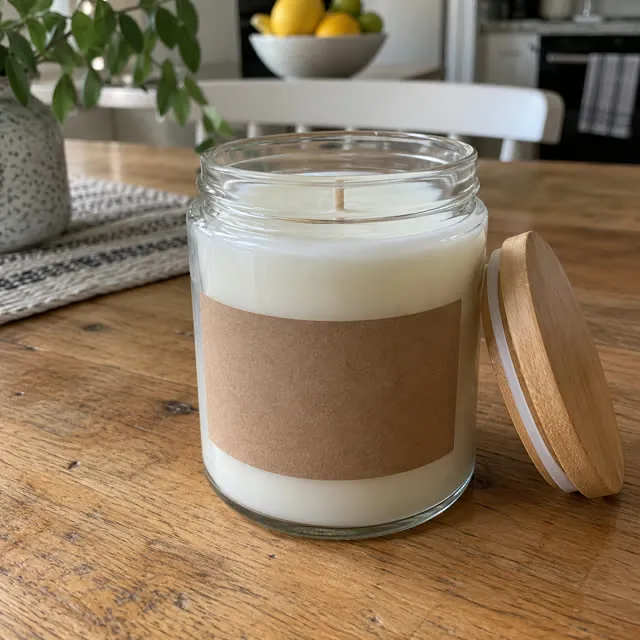
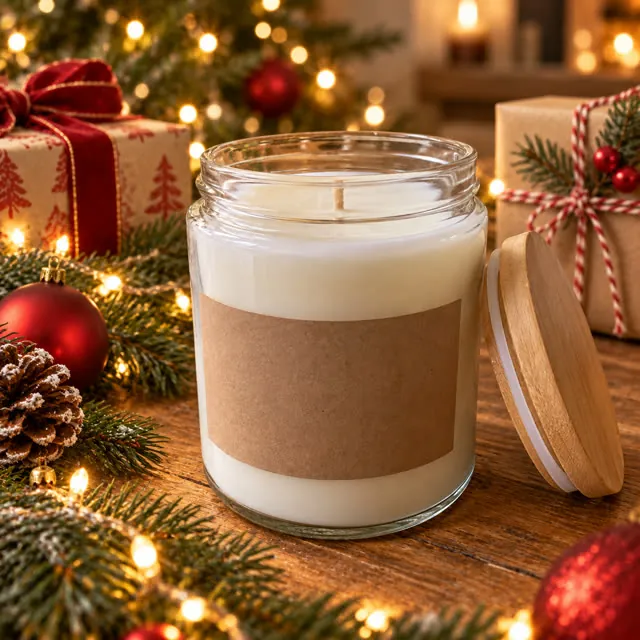
Holiday or Christmas product photos can make a secondary image feel seasonal without any sale wording. The product must still match what the shopper receives in color, quantity, included items and size, so keep the product itself unchanged.
Be careful with props. A shopper could assume that gift boxes or decorations are included, so if a scene might suggest that, use a simpler one or state clearly what is in the package elsewhere in your image set. Never use a holiday scene as an Amazon main image, which needs a pure white background.
Black Friday image timeline for 2026
Fixed dates come from Amazon’s announcements. We could not find an official 2026 start date for Black Friday Week, and third-party reports put the 2025 event at November 20 to December 1, so the go-live date below is our suggestion. Check your Deals dashboard for the dates that apply to you.
| Date | What to do |
|---|---|
| Now | Check main images and list the listings with missing or weak images |
| November 13 | Amazon’s extended deal sourcing window for the US closes |
| By about November 16 | Have new images live, leaving time to catch rejected or suppressed uploads |
| November 27 | Black Friday. Avoid non-urgent listing changes |
| November 30 | Cyber Monday |
| December | Remove anything that only makes sense for the event, and restore your regular images if needed |
How to change images safely
- Save your current image set and file names first, so you can restore it quickly.
- Change one thing at a time on your most important listings, so you can see what caused a change in clicks or sales.
- Do not replace a main image that works just to look seasonal.
- After uploading, confirm that the new image is live and that the listing is still active. A suppressed listing stops appearing in search.
- If AI helped create an image, it must still show the real product. See the rules for AI images on Amazon.
TikTok Shop and Shopify
TikTok Shop’s listing policy says product images cannot include added logos, text, borders, watermarks or graphics, and must include only what the customer will receive. That rules out sale badges, and holiday props are a risk too. See why TikTok Shop rejects images.
On your own Shopify store you have more freedom, but Shopify product images often feed other channels. Google says marketing callouts and mentions of price or discounts can get an image disapproved. A simple approach is to keep product images clean, at the recommended Shopify size, and put the offer in the sale price, banners and collection pages.
Common questions
Can I put “Black Friday” on my Amazon main image?
No. The main image should show only the product on a pure white background, with no text, badges or promotional messaging.
What should Amazon Black Friday images show?
The same things as at any other time: the real product, what is in the box, its size and how it is used. Let the deal or coupon carry the offer, and add a holiday scene only where it helps and does not suggest extra items.
Can I put a discount on Amazon secondary images?
It is safest not to. Amazon’s guidelines, as quoted in its seller forums, do not allow promotions in any product image, and an Amazon forum representative called pricing text on an image a violation. Use a deal or coupon instead.
Will changing my main image before Black Friday hurt my ranking?
Amazon does not publish how an image change affects ranking. The clearer risks are a non-compliant image getting the listing suppressed, or a new image attracting fewer clicks. Only replace a main image when you have a clear reason, and keep the old file.
Can I use Christmas product photos on Amazon?
Yes, as secondary images, if the product is accurate and props do not suggest extra items. The main image still needs a pure white background, with no seasonal scene.
How do I make a Black Friday banner from a product photo?
Start from a real photo, create a wide scene with space for text, check that the product is unchanged, then add the offer in a design tool. Use it on your store, in emails or in ads, not as a marketplace product image.
Is it too late to update images for Black Friday?
Usually not. Unlike deal submissions, image changes have no Black Friday deadline that we could find. Allow time to catch problems, and aim to finish before Black Friday Week begins.
Should I make special Black Friday images for every product?
No. Fix missing and weak images on your best sellers and deal products first. Those images keep working after the event, while sale wording does not.
Sources
Platforms change their rules, so check the latest requirements in your seller account before you upload.
- Amazon Seller Forums: Black Friday and Cyber Monday deals deadline extended
- Amazon Seller Forums: Product Photography Standards
- Amazon Seller Forums: promotional text in product images
- Amazon Ads: Black Friday and Cyber Monday advertising tips
- My Amazon Guy: Black Friday listing prep (third party, 2025 event dates)
- Google Merchant Center Help: Image link
- TikTok Shop Seller University: Product Listing Policy
- Shopify Help Center: Product media types